
Use custom FHIR profiles
FHIR R4 resources allow many ways to represent the same information. If your app or a receiving system expects a more specific shape, a custom profile gives Lang2FHIR a target for the resource it generates.
Why use a profile
Use a custom profile when the standard resource or a supported profile does not cover your requirements. It helps keep generated resources consistent, but it cannot confirm that the note supports every value or that a receiving system will accept the result. Compare the resource with the note and validate it against the receiving system's requirements before writeback.
For example, a lab app might need every generated Observation to include an agreed test code, a value with units, and a patient reference. A FHIR profile can make fields required and limit which codes are allowed. Your team can use those same rules to check the output before sending it downstream.
Upload the profile's StructureDefinition to your dedicated instance, then select it in Lang2FHIR. Manage profiles and implementation guides in the Console.
Prepare a profile
Start with the requirements your app or receiving system needs. Use your FHIR
tooling to author, generate, and validate the StructureDefinition JSON.
It needs snapshot.element; a differential alone is not enough. Give it a
stable id and canonical url, and keep the authored source in your repository.
The Profiling FHIR specification explains
which fields and terminology a profile can constrain.
Manage profiles in the Console
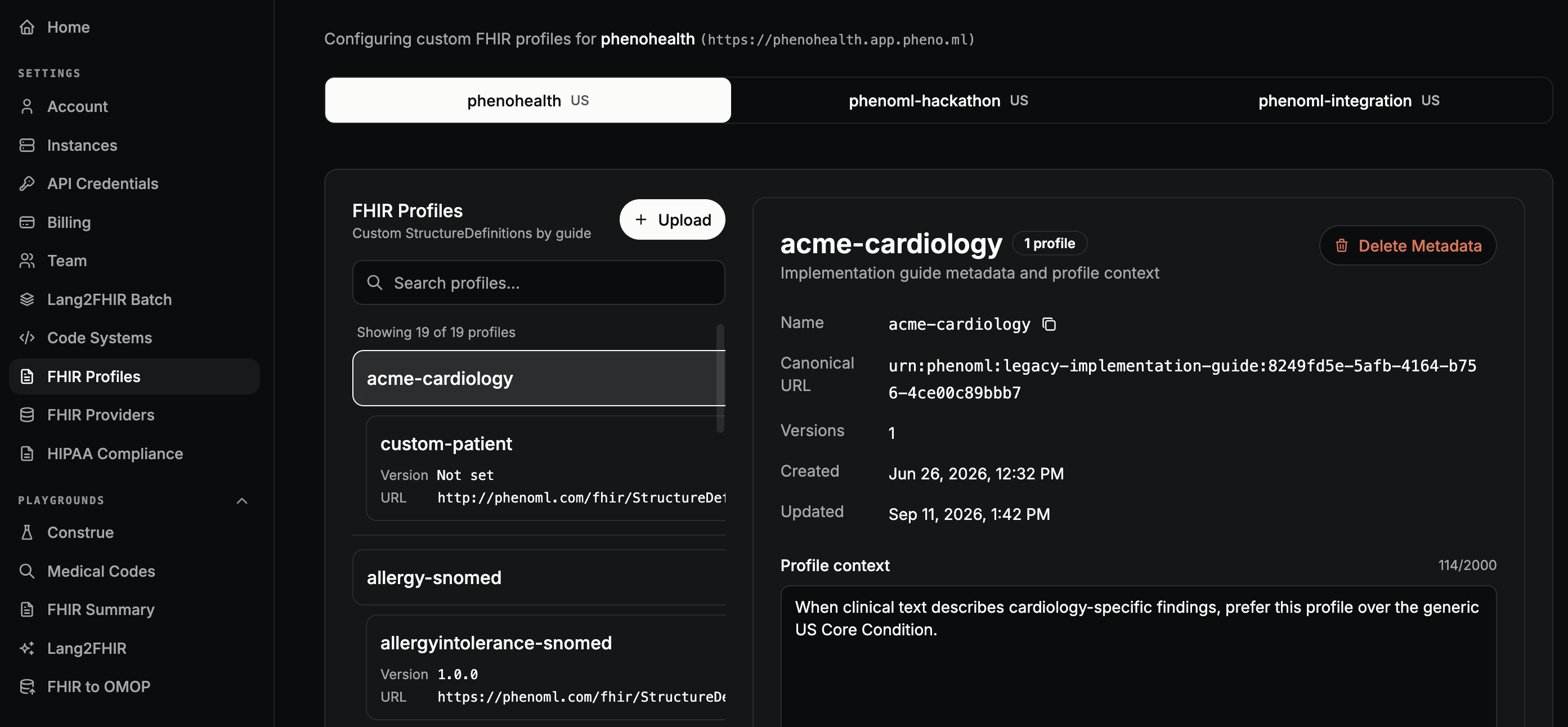
Open Settings → FHIR Profiles in the Console and choose your dedicated instance. Use Upload to add a prepared StructureDefinition. The list groups profiles by implementation guide; select a guide to see its metadata and profile context, or select a profile to view its details.
Automate upload and use
For scripted uploads, use the SDK. Then request the uploaded profile by ID in Lang2FHIR, as shown below.
Install the Python SDK and set credentials and your dedicated instance URL:
python -m pip install phenoml
export PHENOML_CLIENT_ID="your-client-id"
export PHENOML_CLIENT_SECRET="your-client-secret"
export PHENOML_BASE_URL="https://your-instance.pheno.ml"
An outpatient clinic receives final chemistry results as text. Its review
process expects a potassium Observation with LOINC 2823-3,
a patient reference, a collection time, and a numeric value in mmol/L.
Save the full, validated StructureDefinition as prepared-profile.json. In
this example, its id is outpatient-potassium and its canonical url is
https://example.org/fhir/StructureDefinition/outpatient-potassium. The
following are selected constraints from snapshot.element to explain the
profile. The prepared file must contain the complete generated snapshot. This is an excerpt of a StructureDefinition, not a file to upload.
[
  { "id": "Observation.status", "fixedCode": "final" },
  { "id": "Observation.subject", "min": 1 },
  {
    "id": "Observation.effective[x]",
    "min": 1,
    "type": [{ "code": "dateTime" }]
  },
  {
    "id": "Observation.value[x]",
    "min": 1,
    "type": [{ "code": "Quantity" }]
  },
  {
    "id": "Observation.code",
    "patternCodeableConcept": {
      "coding": [{ "system": "http://loinc.org", "code": "2823-3" }]
    }
  }
]
The profile requires a Quantity; the app must also check its UCUM unit before using the value. The source note is synthetic:
Outpatient chemistry result for patient demo-1042.
Serum specimen collected 2026-10-20 at 09:15 EDT.
Potassium 5.8 mmol/L. Lab reference range 3.5-5.1 mmol/L.
Flagged high. Result status: final.
Sodium 139 mmol/L and creatinine 0.9 mg/dL were also reported.
The clinician ordered a repeat panel; no repeat result is available yet.
This call requests one Observation for potassium. The other results provide context in the note.
import json
import os
from pathlib import Path
from phenoml import PhenomlClient

client = PhenomlClient(
    client_id=os.environ["PHENOML_CLIENT_ID"],
    client_secret=os.environ["PHENOML_CLIENT_SECRET"],
    base_url=os.environ["PHENOML_BASE_URL"],
)
profile = json.loads(Path("prepared-profile.json").read_text())
assert profile["resourceType"] == "StructureDefinition"
assert profile["id"] == "outpatient-potassium"
assert profile.get("snapshot", {}).get("element")
created = client.profiles.profiles.create(structure_definition=profile)
print("Uploaded:", created.id, created.resource_type)
note = """Outpatient chemistry result for patient demo-1042.
Serum specimen collected 2026-10-20 at 09:15 EDT.
Potassium 5.8 mmol/L. Lab reference range 3.5-5.1 mmol/L.
Flagged high. Result status: final.
Sodium 139 mmol/L and creatinine 0.9 mg/dL were also reported.
The clinician ordered a repeat panel; no repeat result is available yet."""
resource = client.lang2fhir.create(
    version="R4",
    resource=profile["id"],
    text=note,
)
print("Generated:", resource.get("resourceType"))
print(resource)
Illustrative output: the first two lines show that the profile was uploaded and Lang2FHIR returned an Observation. The resource below shows the potassium result from the note. Actual output depends on your full profile and note.
Uploaded: outpatient-potassium Observation
Generated: Observation
{
  "resourceType": "Observation",
  "status": "final",
  "code": {
    "coding": [{
      "system": "http://loinc.org",
      "code": "2823-3",
      "display": "Potassium [Moles/volume] in Serum or Plasma"
    }]
  },
  "subject": { "reference": "Patient/demo-1042" },
  "effectiveDateTime": "2026-10-20T09:15:00-04:00",
  "valueQuantity": {
    "value": 5.8,
    "unit": "mmol/L",
    "system": "http://unitsofmeasure.org",
    "code": "mmol/L"
  },
  "referenceRange": [{
    "low": { "value": 3.5, "unit": "mmol/L" },
    "high": { "value": 5.1, "unit": "mmol/L" }
  }]
}
Validate the returned resource against the full profile and compare its patient
reference, collection time, value, unit, and range with the note. The repeat
order is not a repeat result and must not become another result Observation.
For multi-resource detection, place profiles in an implementation guide package
and pass its name as implementation_guide to create_multi. That adds the
package's profiles to the default profile set.
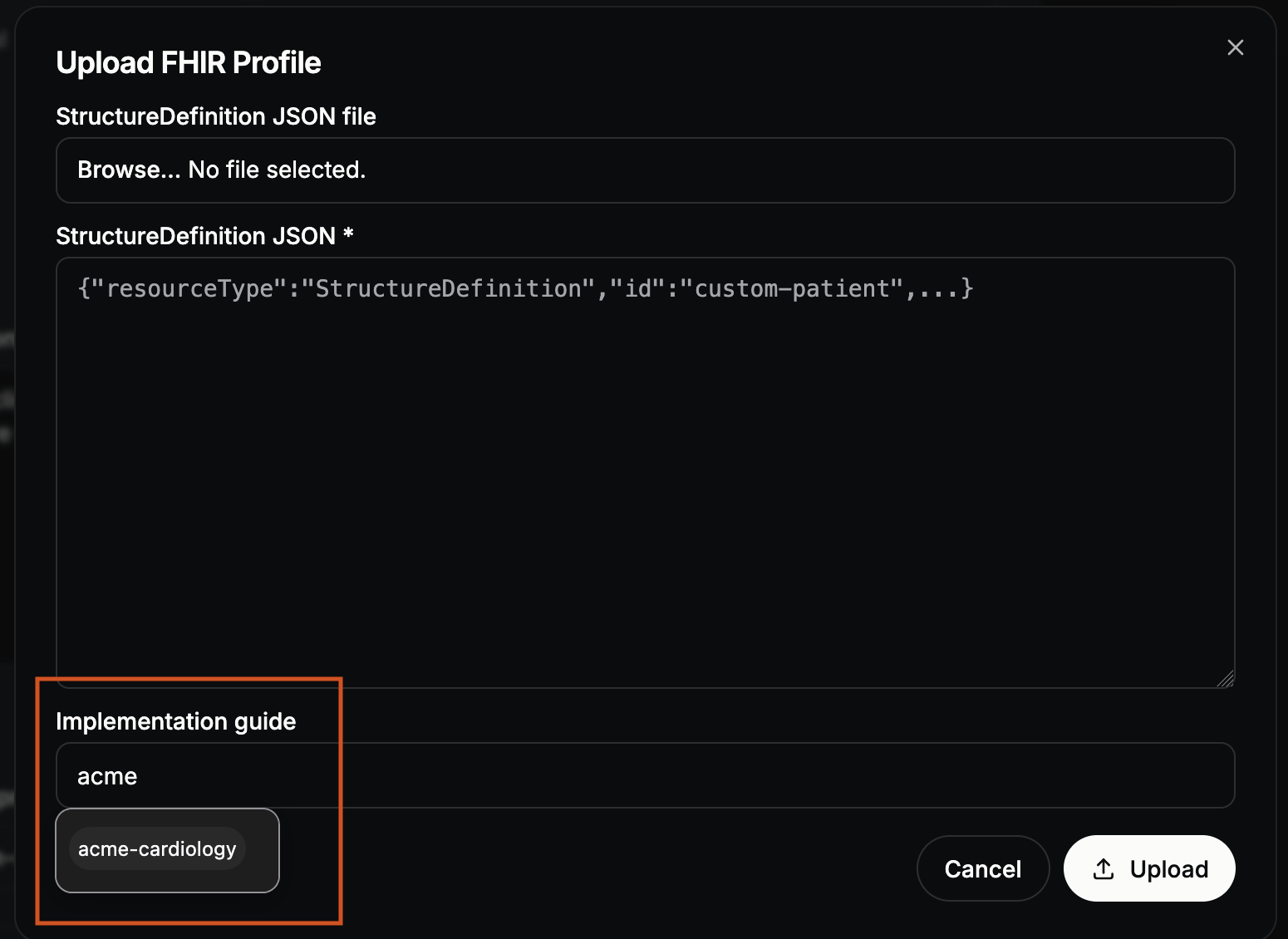
When uploading a profile in the Console, select its implementation guide in the upload dialog to add the profile to that guide.
Update it
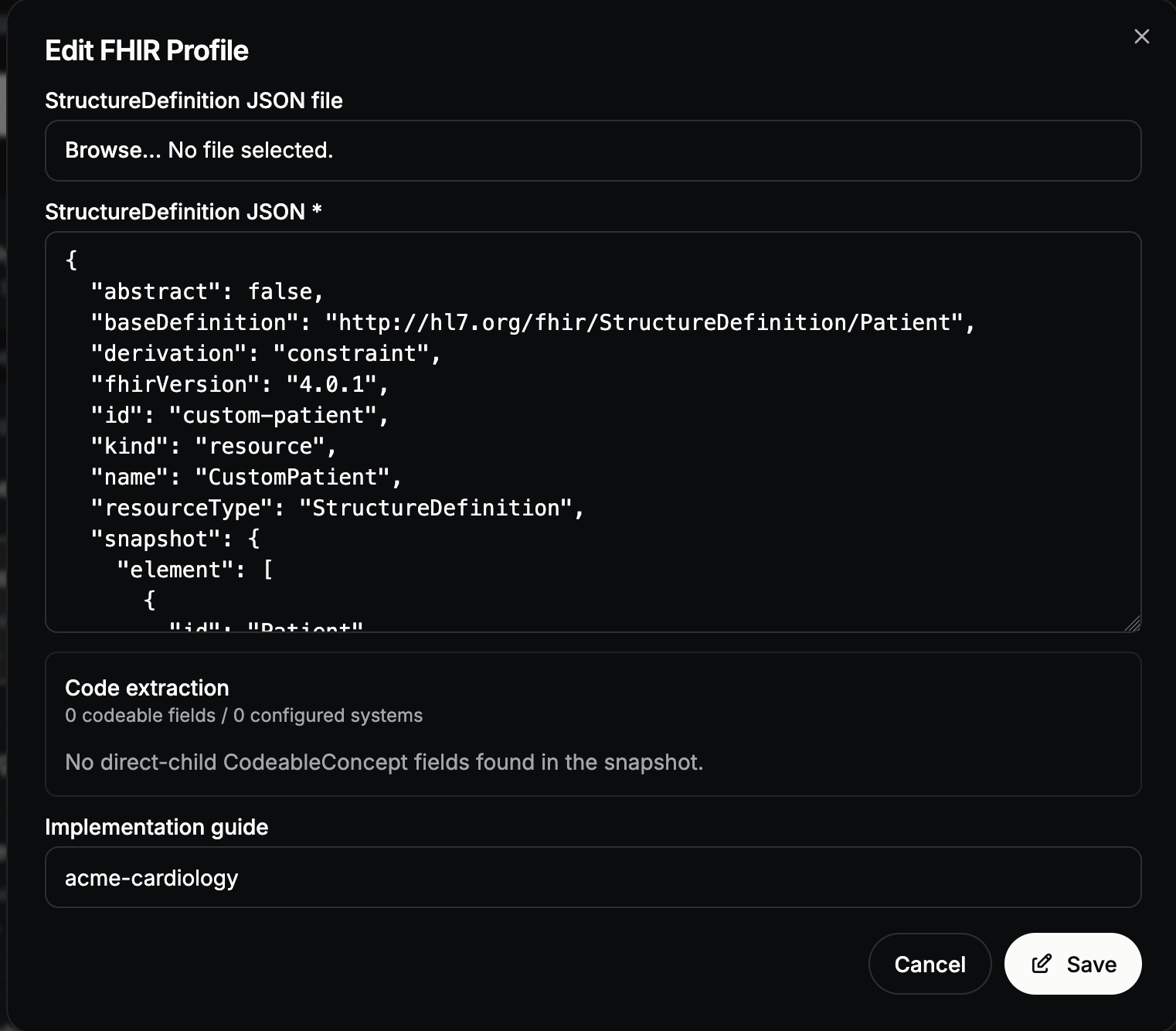
In the Console, select the profile and choose Edit. Upload a revised StructureDefinition JSON file or edit the JSON in the form, check its implementation guide, then choose Save.
For scripted updates, upload a revised prepared snapshot with
client.profiles.profiles.update(profile["id"], structure_definition=revised).
The service keeps earlier versions. Check the active version and any dependent
guide packages before changing a profile. The
FHIR profiles reference covers versions
and guide packages.